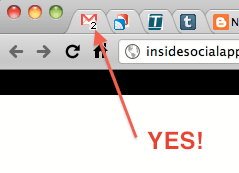
Gmail
has just launched small but really useful feature in Gmail Labs. Dynamic Favicon showing unread email counts directly in your browser tab icon. If your browser window has lots and lots of tabs open at anytime, this might be really a wonderful feature that lets user know of any unread item.
Here is a small and powerful script in PHP that lets you create your own
Dynamic favicon. We will use PHP GD library to manipulate the favicon image and add text into it.
Below is the simple script that reads a favicon image add add some text character on it.
File: favicon.php
<?php
$im = imagecreatefrompng("favicon.png");
if(isset($_GET['char']) && !empty($_GET['char'])) {
$string = $_GET['char'];
} else {
$string = 'V';
}
$bg = imagecolorallocate($im, 255, 255, 255);
$black = imagecolorallocate($im, 0, 0, 0);
imagechar($im, 2, 5, 1, $string, $black);
header('Content-type: image/png');
imagepng($im);
?>
Code language: PHP (php)
The above code is pretty much self explanatory. We read a character from GET request and add it into the favicon image. Note here that we are using a template favicon image which me modify. You can place any favicon of your choice near favicon.php file.
Download Source Code
Click here to download complete source code (ZIP, 3kb)
Online Demo
Click here to view online demo
 Gmail has just launched small but really useful feature in Gmail Labs. Dynamic Favicon showing unread email counts directly in your browser tab icon. If your browser window has lots and lots of tabs open at anytime, this might be really a wonderful feature that lets user know of any unread item.
Here is a small and powerful script in PHP that lets you create your own Dynamic favicon. We will use PHP GD library to manipulate the favicon image and add text into it.
Below is the simple script that reads a favicon image add add some text character on it.
File: favicon.php
Gmail has just launched small but really useful feature in Gmail Labs. Dynamic Favicon showing unread email counts directly in your browser tab icon. If your browser window has lots and lots of tabs open at anytime, this might be really a wonderful feature that lets user know of any unread item.
Here is a small and powerful script in PHP that lets you create your own Dynamic favicon. We will use PHP GD library to manipulate the favicon image and add text into it.
Below is the simple script that reads a favicon image add add some text character on it.
File: favicon.php


We can make some favicon_1.png favicon_2.png … favicon_9.png
and use javascript to set it.
You can then use a link tag to set the png as your favicon like this:
thanksssss….. help full ….for me……
why do you definde $bg and don’t use it anywhere?
Hey You are really great, You show a really great method to use counter favicon.
Thanks Viral. Very useful for me!!
I improved it a little bit, hope you are fine with this: https://github.com/gaffling/PHP-dynamic-Counter-Favicon