Twitter, The popular micro blogging and real time update site has changed the way we interact in internet world. Not only it has became a source of latest updates/news going in world, but also an addiction to lot of those who tweets regularly.
Twitter has provided lots of API that can be used to Get the latest tweets / Add tweets / Search the tweets / Get the trends etc.. These APIs are REST APIs that can be called by using any scripting language and getting the result back. You can read full specifications of API at
Twitter’s API site.
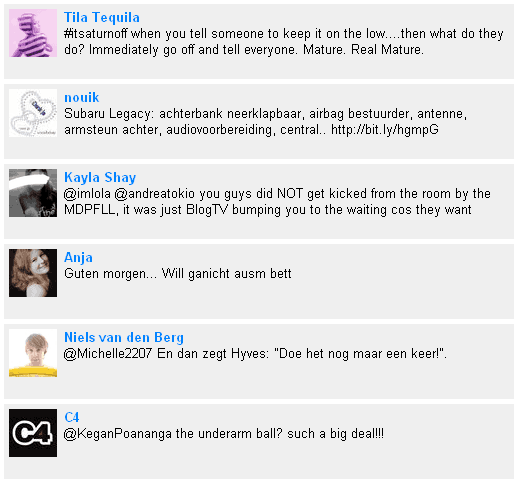
Let us first see the small demo that I have created. This demo page will read latest public tweets every 10 second and update it on screen with some animation effect.
Click here to view the demo.
We will use a PHP library to call the Twitter APIs and get the result. Following is the code of library. Just copy paste it in a file called
Twitter.class.php.
<?php
class Twitter {
var $username='';
var $password='';
var $responseInfo=array();
function public_timeline($format) {
$request = 'http://twitter.com/statuses/public_timeline.'.$format;
return $this->process($request);
}
function friends_timeline($format='xml',$count=20) {
$request = 'http://twitter.com/statuses/friends_timeline.'.$format;
$postargs = "count=$count";
return $this->process($request,$postargs);
}
function user_timeline($format='xml',$id=null) {
$request = 'http://twitter.com/statuses/user_timeline.'.$format;
if($id) {
$postargs = "id=$id";
return $this->process($request,$postargs);
}
return $this->process($request);
}
function update($format = 'xml',$status){
$request = 'http://twitter.com/statuses/update.'.$format;
$postargs = 'status='.urlencode($status);
return $this->process($request,$postargs);
}
function replies($format='xml') {
$request = 'http://twitter.com/statuses/replies.'.$format;
return $this->process($request);
}
function friends($format='xml',$id=null,$page=1) {
$request = 'http://twitter.com/statuses/friends.'.$format;
$postargs = "page=$page";
if($id) {
$postargs .= "&id=$id";
}
return $this->process($request,$postargs);
}
function followers($format='xml',$id=null,$page=1) {
$request = 'http://twitter.com/statuses/followers.'.$format;
$postargs = "page=$page";
if($id) {
$postargs .= "&id=$id";
}
return $this->process($request,$postargs);
}
function show($format='xml',$id) {
$postargs = "";
$request = 'http://twitter.com/users/show/'.$id.".$format";
return $this->process($request);
}
function create($format='xml',$user_ID) {
$request = "http://twitter.com/friendships/create/$user_ID.$format";
return $this->process($request);
}
function destroy($format='xml',$user_ID) {
$request = "http://twitter.com/friendships/destroy/$user_ID.$format";
return $this->process($request);
}
function exists($format='xml',$user_ID_a,$user_ID_b) {
$request = "http://twitter.com/friendships/exists.$format?user_a=$user_ID_a&user_b=$user_ID_b";
return $this->process($request);
}
function process($url,$postargs=false){
$curl_conn = curl_init();
curl_setopt($curl_conn, CURLOPT_URL, $url);
curl_setopt($curl_conn, CURLOPT_HTTPAUTH, CURLAUTH_BASIC);
curl_setopt($curl_conn, CURLOPT_USERPWD, $this->username.":".$this->password);
curl_setopt($curl_conn, CURLOPT_SSL_VERIFYPEER, false);
curl_setopt($curl_conn, CURLOPT_RETURNTRANSFER, 1);
$output = curl_exec($curl_conn);
$this->responseInfo=curl_getinfo($curl_conn);
curl_close($curl_conn);
if(intval($this->responseInfo['http_code'])==200){
return $output;
}else{
return "Error: " . $this->responseInfo['http_code'];
}
}
}
?>
Code language: PHP (php)
Now create a file called twitter-reader.php in the same folder as of Twitter.class.php and copy following content in it.
<html>
<head>
<title>Twitter Client example using PHP library - viralpatel.net</title>
<style>
body {
font-family: sans-serif;
font-size: 13px;
}
height: 65px;
width: 500px;
background-color:
margin-bottom: 5px;
padding: 5 5 5 5;
}
float:left;
display: inline;
padding-right: 7px;
}
font-weight: bold;
color:
}
</style>
<script src="jquery-1.3.1.min.js" language="javascript"></script>
</head>
<body>
<div id="updates">
<?php
include("Twitter.class.php");
$twitter = new Twitter();
$json = $twitter->public_timeline('json');
$updates = json_decode($json);
foreach ($updates as $update) {
?>
<div id="update">
<div id="left"><img width="48px" height="48px" src="<?=$update->user->profile_image_url?>"/></div>
<div id="right">
<div class="user"><?=$update->user->name?></div>
<div class="detail">
<?=$update->text?>
</div>
</div>
</div>
<?php
}
?>
</div>
<script>
$(document).ready(function(){
getlatest();
});
function getlatest() {
$.ajax({
type: "GET",
url: "latest-tweet.php",
cache: false,
success: function(html){
$("div#updates").prepend(html);
$("#update").slideDown("400");
}
});
setTimeout("getlatest();", 10000);
}
</script>
</body>
</html>
Code language: PHP (php)
That’s it. Your simple twitter reader (client) that reads public tweets is ready. I have used some jQuery code to pull latest tweets every 10 seconds and display them on screen. For that we are using a php file latest-tweet.php which calls our PHP library and gets the latest tweet. Following is the content of latest-tweet.php
<?php
include("Twitter.class.php");
$twitter = new Twitter();

$json = $twitter->public_timeline('json');
$updates = json_decode($json);
$update = $updates[0];
?>

<div id="update" style="display:none">
	<div id="left"><img width="48px" height="48px" src="<?=$update->user->profile_image_url?>"/></div>
	<div id="right">
		<div class="user"><?=$update->user->name?></div>
		<div class="detail">
		<?=$update->text?>
		</div>
	</div>
</div>
Code language: PHP (php)
Thus, all we need is three php files Twitter.class.php, twitter-reader.php and latest-tweet.php and that’s it.
There are different API functions available in Tweeter.class.php that can be used to do lot of things around twitter. Functions are pretty much self explanatory. Give it a try and let me know.
 Twitter, The popular micro blogging and real time update site has changed the way we interact in internet world. Not only it has became a source of latest updates/news going in world, but also an addiction to lot of those who tweets regularly.
Twitter has provided lots of API that can be used to Get the latest tweets / Add tweets / Search the tweets / Get the trends etc.. These APIs are REST APIs that can be called by using any scripting language and getting the result back. You can read full specifications of API at Twitter’s API site.
Let us first see the small demo that I have created. This demo page will read latest public tweets every 10 second and update it on screen with some animation effect.
Click here to view the demo.
We will use a PHP library to call the Twitter APIs and get the result. Following is the code of library. Just copy paste it in a file called
Twitter, The popular micro blogging and real time update site has changed the way we interact in internet world. Not only it has became a source of latest updates/news going in world, but also an addiction to lot of those who tweets regularly.
Twitter has provided lots of API that can be used to Get the latest tweets / Add tweets / Search the tweets / Get the trends etc.. These APIs are REST APIs that can be called by using any scripting language and getting the result back. You can read full specifications of API at Twitter’s API site.
Let us first see the small demo that I have created. This demo page will read latest public tweets every 10 second and update it on screen with some animation effect.
Click here to view the demo.
We will use a PHP library to call the Twitter APIs and get the result. Following is the code of library. Just copy paste it in a file called 



Ha love it ‘It’s like shutting down the water when you’re brushing your teeth’ great post ;)
Thanks for the comment Ashley :)
I know its bit fast to comprehend what all tweets are getting in there ;)
Where is the function json_decode?I tried to execute twitter-reader.php but got undefined function json_decode(). please send the json_decode function code
Hi John, The json_decode function comes with the PHP installation in webserver. Please check the PHP version in your webhosting or in your machine if you running locally. Check the manual of json_decode here http://us.php.net/json_decode.
Thanx for sharing this code..
But I have one problem. Using the friends_timeline() from Twitter class, when the Ajax update called, it still returned the latest friend update even if it has already displayed before.
I think you should add a method to check wether the latest friend tweet is already displayed or not.
Hey ,
I just found you out while googling , and this a really nice blog. :)
Expect me to be a frequent visitor here. Will read all your posts
Thanks ,
Regards ,
Sourish
(Admin)
OneTrickADay
Hey Sourish, Welcome..
Feel free to subscribe for RSS feed and Email Newsletter. :)
Hi Viral, Thank you for this great post, I actually tried your code locally using XAMPP but it is not working for me, i am just getting a blank screen… Anythoughts? am i missing something, any help would be greatly appreciated
regards
Very nice code! Works very clear and easy =) but I also got a question.. Im looking for a function to call the next page with search results as described in twitter API. Now I got something like this..
function more_timeline($format=’xml’, $count=20) {
$request = ‘http://twitter.com/statuses/friends_timeline.’.$format.’?page=’.$my_page.’&max_id=’.$my_max_id.”;
//$postargs = “count=$count”;
return $this->process($request);
}
How can I use this function from my client website and give the variables $my_page and $my_max_id to specify the ‘next’ page? I hope you can help me out! Thanks!
Sounds interesting, although there are so many of them already! Twitter reader is exactly what’s needed now. I managed to find the one I like most – http://www.litefeed.com. What do you think?
demo not working to me,…
:(