Show Multiple Examples in OpenAPI – OpenAPI (aka Swagger) Specifications has become a defecto standard for documenting and sharing REST API. When using OpenAPI it is always best practice to add as much detail as we can. The API specification should be built from the API consumers perspective. The DX or developer experience is important when developing the API.
To improve the API experience we must define attributes with descriptions and example. It is also possible to define multiple examples to show different way the API can be consumed / requested.
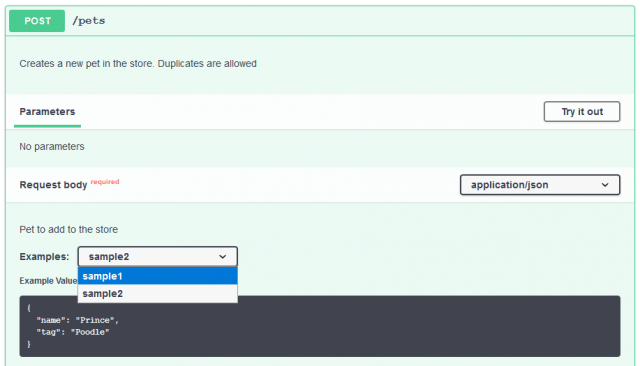
First, let us see how swagger editor (editor.swagger.io) shows multiple examples. The examples are shown in a dropdown where user can choose and see appropriate request payload. sample1 and sample2 are two examples for Pet store API.
Adding Multiple Examples in OpenAPI
To add multiple examples in OpenAPI, we can define examples attribute as shown below. Notice how we defined sample1 and sample2. You can give any meaningful name relevant to your API.
openapi.yaml
paths:
  /pets:
    post:
      description: Creates a new pet in the store. Duplicates are allowed
      operationId: addPet
      requestBody:
        description: Pet to add to the store
        required: true
        content:
          application/json:
            schema:
              $ref: '#/components/schemas/NewPet'
            examples:
              sample1:
                value:
                  name: Cupcake
                  tag: Chihuahua
              sample2:
                value:
                  name: Prince
                  tag: PoodleCode language: YAML (yaml)
In OpenAPI, we can also provide example at attribute level. While it is good to define an attribute example (e.g. petType) so the consumer of API know what to pass or what to expect from attribute. However it is also a good idea to provide example at broader request/response level.
The request/response level example would provide much broader context to API consumer and also helps documenting API better. Furthermore many mock tools can generate mock responses from the examples provided in Swagger file.
Multiple Examples in API Response
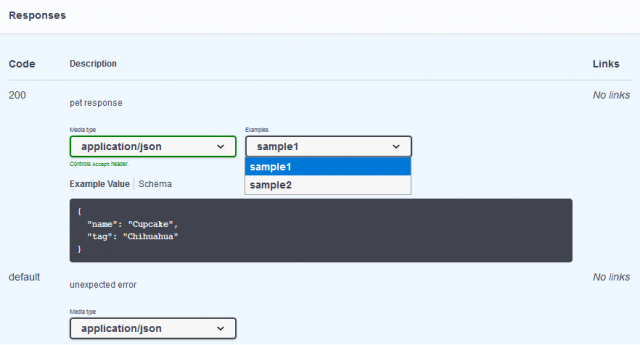
The multiple example works with both API Request and Response. Similar to what we did above, the same can be specified for API Response. In below screenshot we can see how swagger editor shows multiple response example.
openapi.yaml with examples in response
paths:
  /pets:
    get:
      description: Returns all pets
      operationId: findPets
      parameters:
        - name: tags
          in: query
          description: tags to filter by
          required: false
          style: form
          schema:
            type: array
            items:
              type: string
        - name: limit
          in: query
          description: maximum number of results to return
          required: false
          schema:
            type: integer
            format: int32
      responses:
        '200':
          description: pet response
          content:
            application/json:
              schema:
                type: array
                items:
                  $ref: '#/components/schemas/Pet'
              examples:
                sample1:
                  value:
                    name: Cupcake
                    tag: Chihuahua
                sample2:
                  value:
                    name: Prince
                    tag: Poodle
        default:
          description: unexpected error
          content:
            application/json:
              schema:
                $ref: '#/components/schemas/Error'Code language: PHP (php)
Hope this little trick will make your API documentation awesome :-)